Mastering SQL Joins: A Comprehensive Guide
Prefer Video?

TL;DR
If you are working with relational databases, understanding Joins is non-negotiable. They are the mechanism that allows us to recombine data scattered across normalized tables.
This guide covers:
- Inner Join: The intersection of data.
- Outer Joins (Left/Right/Full): Handling missing data.
- Cross Join: Cartesian products.
- Self Join: Hierarchies within a table.
- Lateral Join: The “for-each” loop of SQL.
- Common Pitfalls: What to avoid.
Table of Contents
- TL;DR
- The Dataset
- Inner Join
- Outer Joins
- Cross Join
- Natural Join
- Advanced Joins
- Common Pitfalls
- Summary
The Dataset
To demonstrate these concepts, we’ll use a simple schema involving products and product_manufactured_region.
DROP TABLE IF EXISTS products, product_manufactured_region CASCADE;

CREATE TABLE products (
    id SERIAL,
    product_name VARCHAR(100),
    product_code VARCHAR(10),
    product_quantity NUMERIC(10,2),
    manufactured_date DATE,
    manufactured_region VARCHAR(25),
    added_by TEXT DEFAULT 'admin',
    created_date TIMESTAMP DEFAULT now()
);

CREATE TABLE product_manufactured_region (
    id SERIAL,
    region_name VARCHAR(25),
    region_code VARCHAR(10),
    established_year INTEGER
);

-- Sample Data Injection
INSERT INTO products (product_name, product_code, manufactured_region, product_quantity, manufactured_date)
     VALUES ('Product 1', 'PRD1', 'Europe', 100.25, '20/11/2019'),
            ('Product 1', 'PRD2', 'EMEA', 92.25, '1/11/2019'),
            ('Product 2', 'PRD2', 'APAC', 12.25, '1/11/2019'),
            ('Product 5', NULL, NULL, 11.11, '12/12/2020');

INSERT INTO product_manufactured_region (region_name, region_code, established_year)
      VALUES ('EMEA', NULL, 2010),
             ('APAC', NULL, 2019),
             ('North America', NULL, 2012);
Inner Join
The Inner Join is the most common join type. It returns only the rows where there is a match in both tables. If a product has a region that doesn’t exist in the region table, or a region has no products, those rows are excluded.
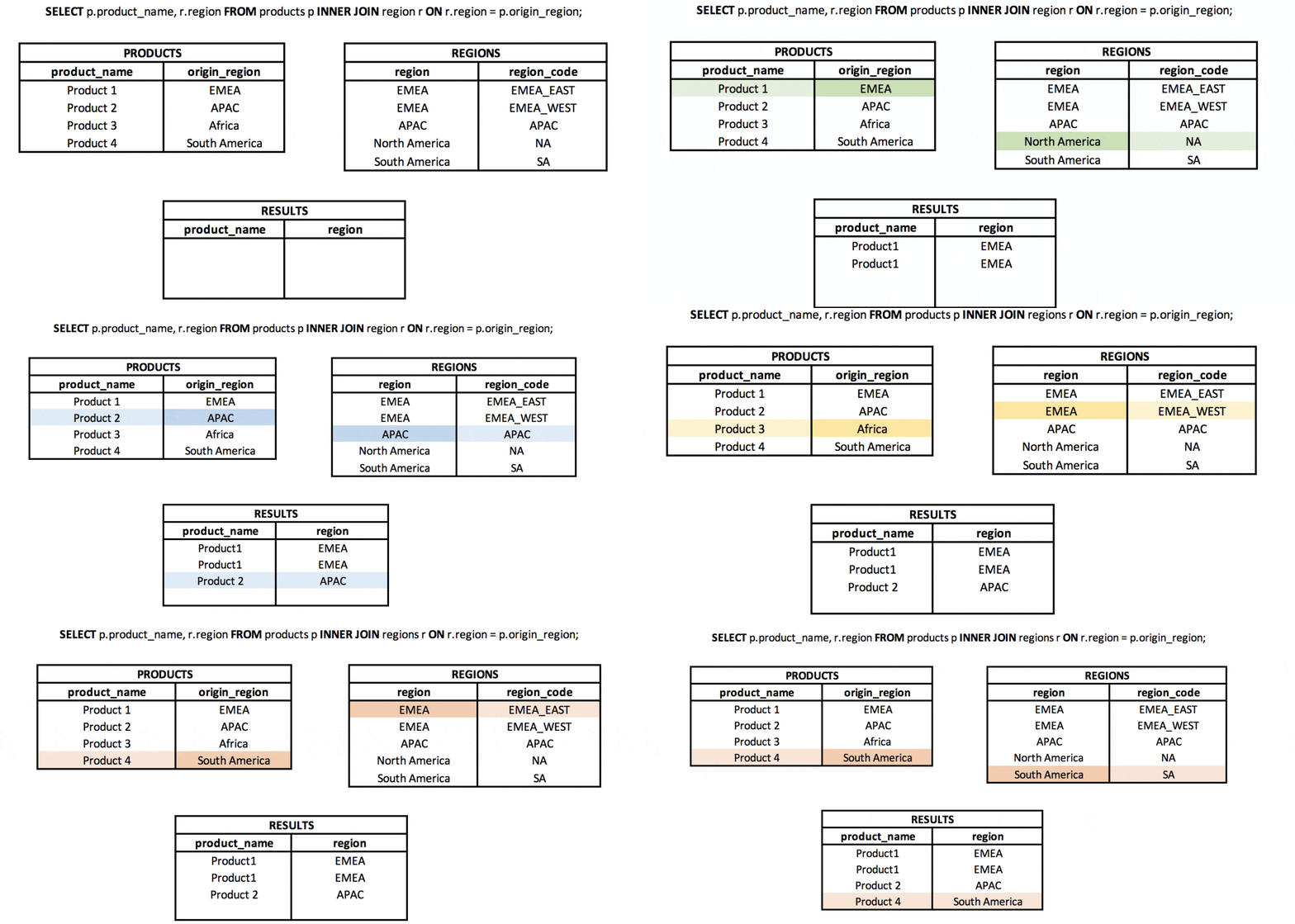
SELECT p.product_name,
       p.product_code,
       p.manufactured_region,
       mr.established_year AS region_establed_at
  FROM products p
 INNER JOIN product_manufactured_region mr
    ON mr.region_name = p.manufactured_region;
Key Takeaway: Think of it as the intersection of two sets.
Outer Joins
Outer joins allow us to retain data even when matches are missing.
Left Join
The Left Join (or Left Outer Join) returns all rows from the left table (the one mentioned first), and the matching rows from the right table. If there is no match, the columns from the right table will be NULL.
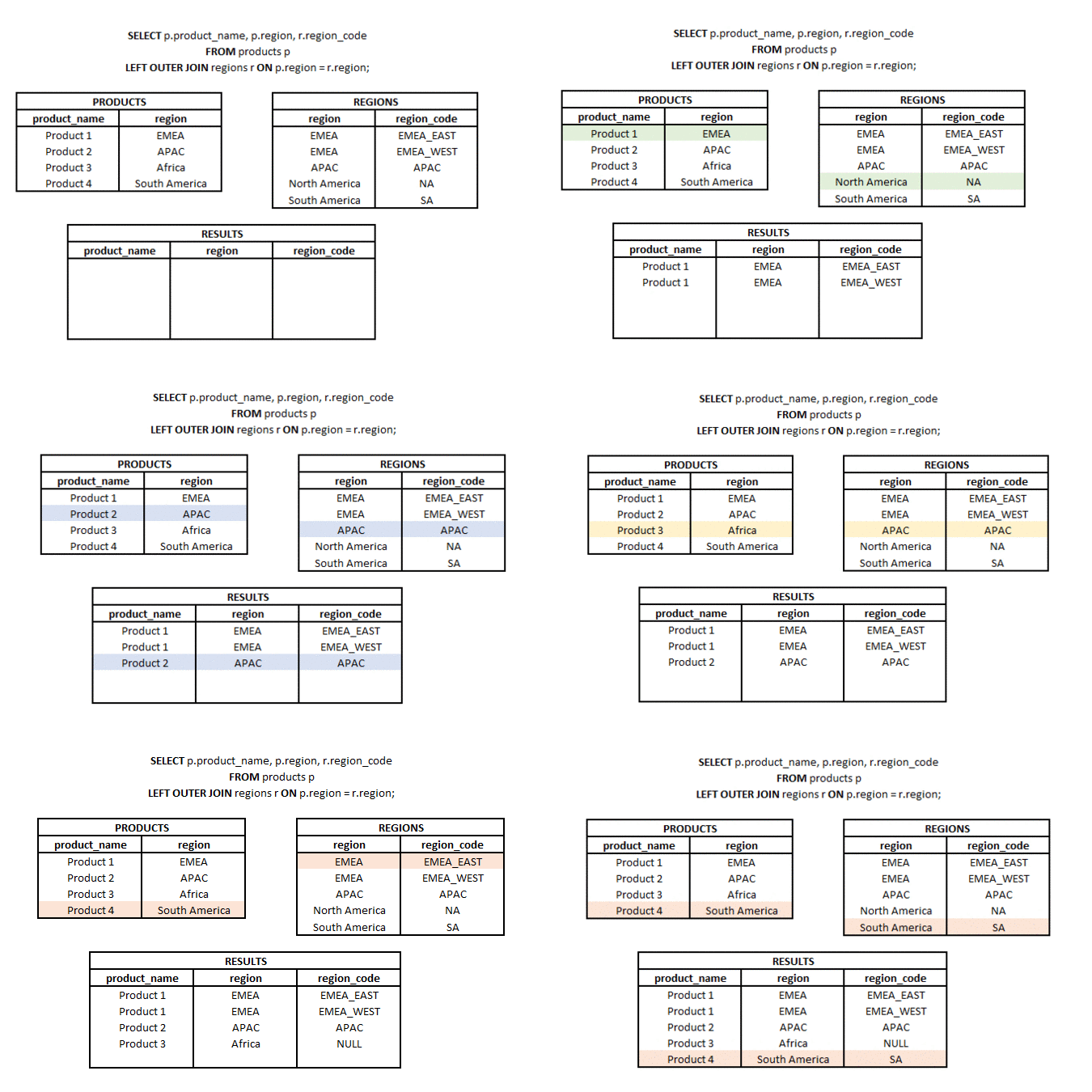
SELECT p.product_name,
       p.product_code,
       p.manufactured_region,
       mr.established_year AS region_establed_at
  FROM products p
  LEFT OUTER JOIN product_manufactured_region mr
    ON mr.region_name = p.manufactured_region;
In our dataset, “Product 5” (which has NULL region) would appear in the result, but with NULL for region_establed_at.
Right Join
The Right Join is the mirror image of the Left Join. It returns all rows from the right table and matched rows from the left.
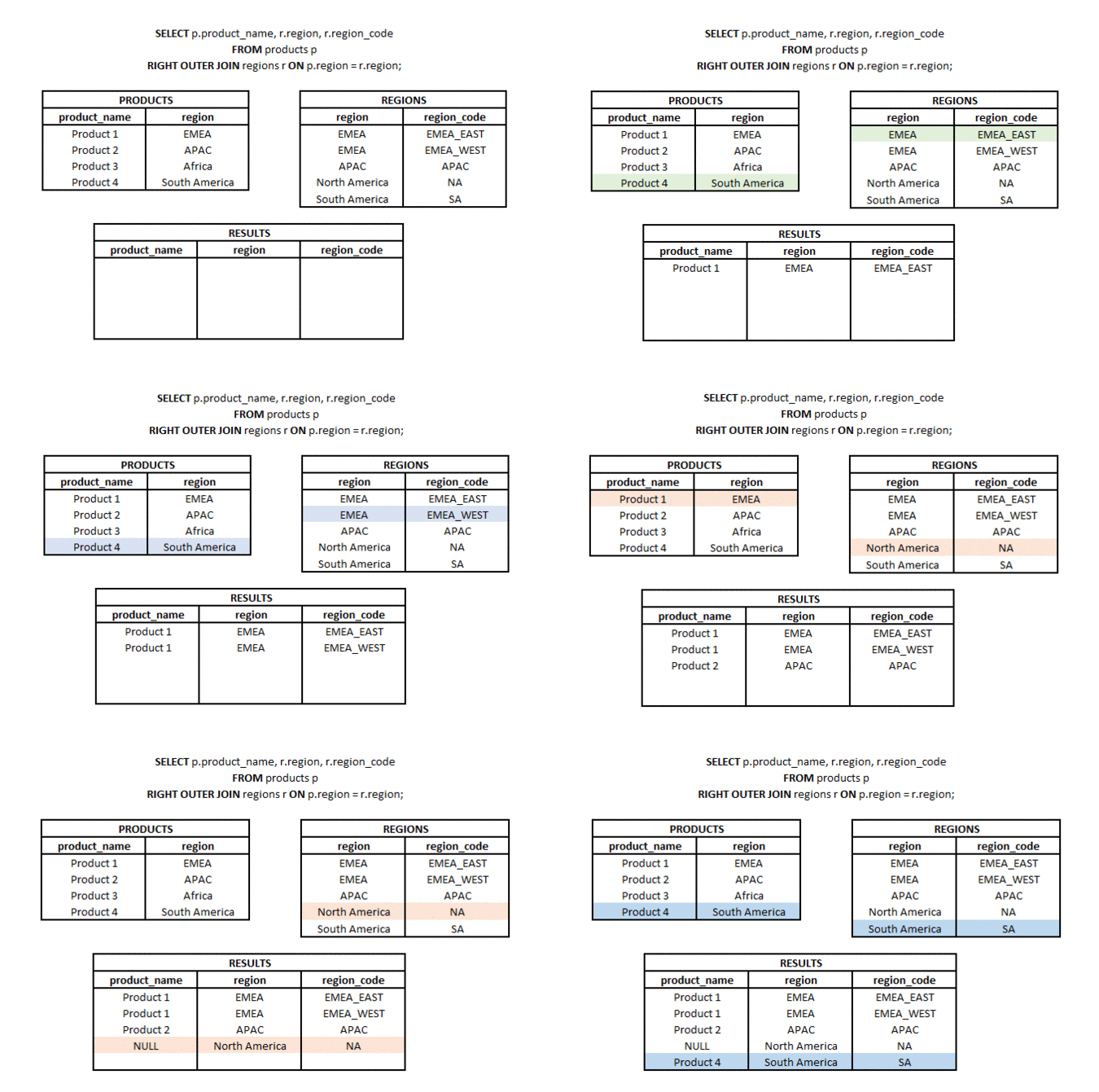
SELECT p.product_name,
       p.product_code,
       p.manufactured_region,
       mr.established_year AS region_establed_at
  FROM products p
 RIGHT OUTER JOIN product_manufactured_region mr
    ON mr.region_name = p.manufactured_region;
Here, “North America” (which has no matching products) would appear, with NULLs for the product columns.
When to use Left vs. Right Join?
Short answer: You should almost always use LEFT JOIN and rarely, if ever, use RIGHT JOIN.
Detailed explanation: Functionally, they are mirror images. Table A LEFT JOIN Table B produces the same dataset as Table B RIGHT JOIN Table A. The difference is purely about readability and cognitive load.
- Reading Flow: In English (and SQL), we read from left to right, top to bottom. A
LEFT JOINfollows this flow: “Take this main table (A), and try to attach details from this secondary table (B).” - Mental Model:
RIGHT JOINforces the reader to mentally “jump ahead” to see the dominant table, then look back. - Chaining: When joining multiple tables,
LEFT JOINkeeps the “main” subject at the top. Mixing them makes it hard to visualize which rows are preserved.
RIGHT JOIN is mostly found in legacy code refactoring where rearranging the main FROM clause is difficult. In new development, treat it as a code smell.
Full Outer Join
The Full Outer Join combines the results of both Left and Right joins. It returns all rows from both tables, matching where possible and filling with NULLs where matches are missing.
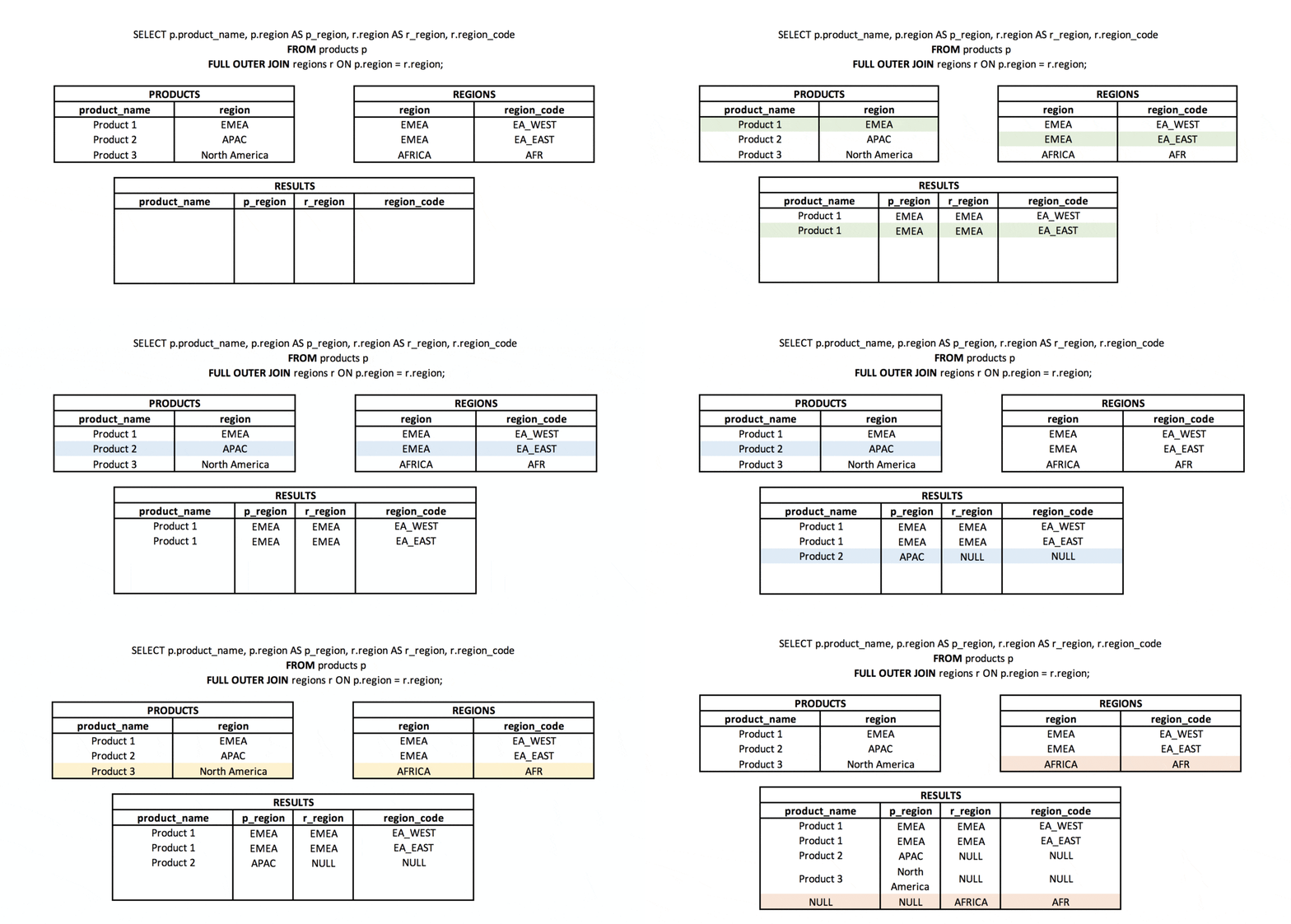
SELECT p.product_name,
       p.product_code,
       p.manufactured_region,
       mr.established_year AS region_establed_at
  FROM products p
  FULL JOIN product_manufactured_region mr
    ON mr.region_name = p.manufactured_region;
This is useful when you want to see “everything from everywhere”—orphaned products and empty regions.
Cross Join
The Cross Join produces a Cartesian product: every row from the first table is paired with every row from the second table. If table A has 10 rows and table B has 10 rows, the result is 100 rows.
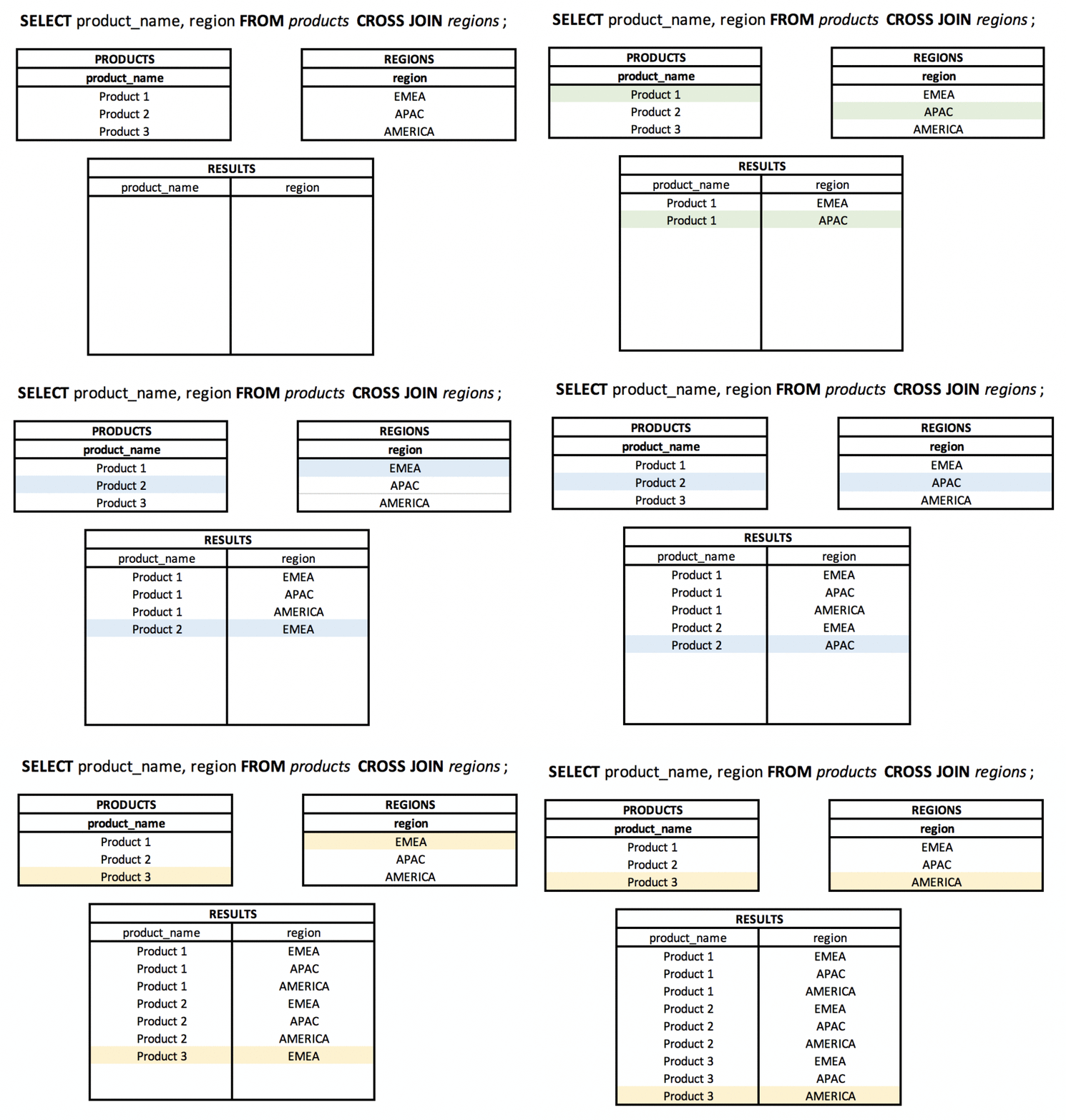
SELECT p.product_name,
       mr.region_name
  FROM products p
 CROSS JOIN product_manufactured_region mr;
Warning: Be very careful with Cross Joins on large tables. They can explode the result set size and kill performance.
Natural Join
A Natural Join automatically joins tables based on columns with the same name.
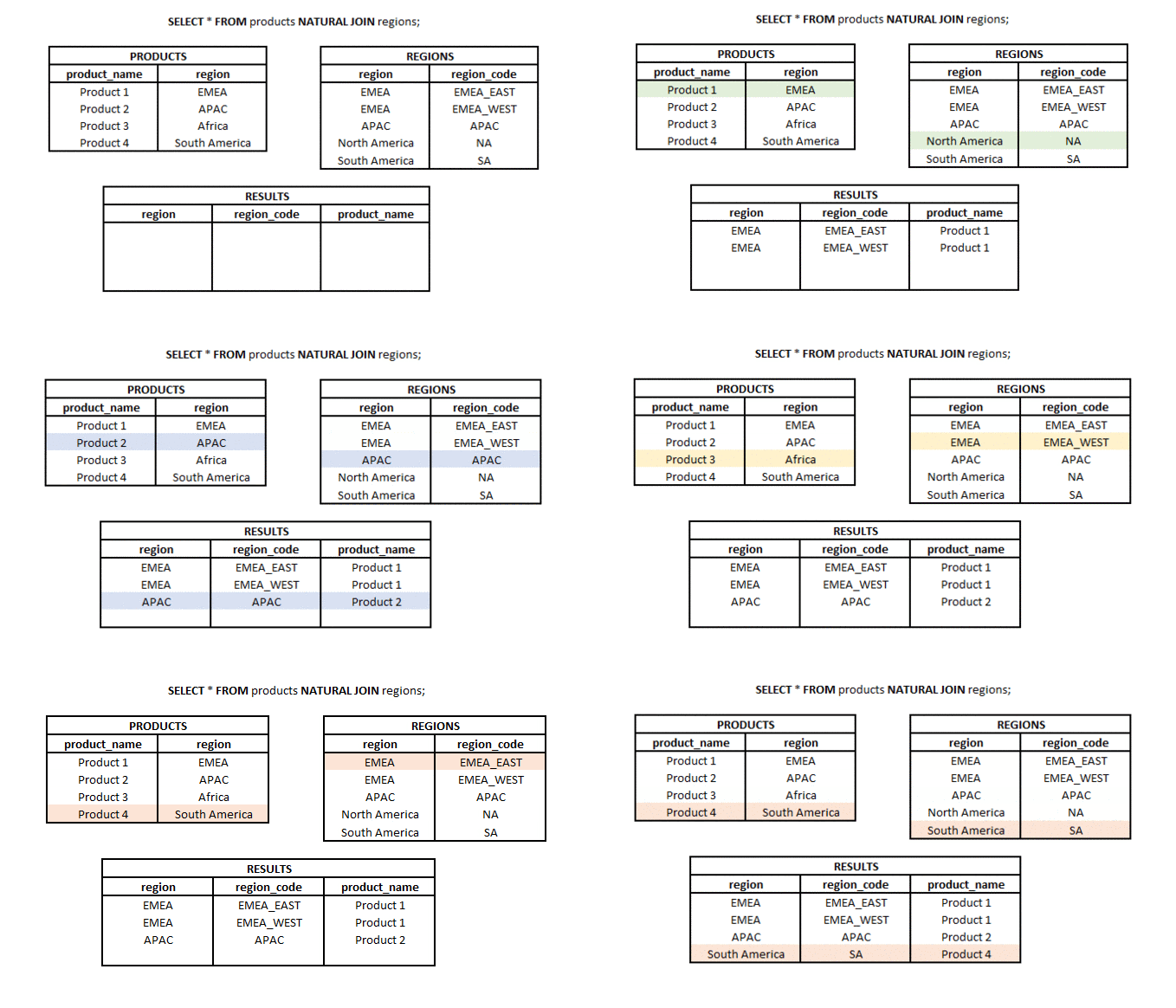
SELECT *
  FROM products
 NATURAL JOIN product_manufactured_region;
Recommendation: Avoid using Natural Joins in production code. They are brittle; if a column is added or renamed in the schema without your knowledge, the query logic can silently change. Stick to explicit INNER JOIN ... ON.
Advanced Joins
Semi-Join
A Semi-Join returns rows from the first table where matches exist in the second table, but it does not duplicate rows from the first table if multiple matches are found. It uses EXISTS or IN.
Unlike an INNER JOIN, which can return duplicate rows from the left table if the right table has multiple matches, a Semi-Join acts as a filter.
-- Find regions that have at least one product manufactured there
SELECT *
  FROM product_manufactured_region mr
 WHERE EXISTS (
    SELECT 1
      FROM products p
     WHERE p.manufactured_region = mr.region_name
 );
Anti-Join
An Anti-Join is the opposite: it finds rows in the first table that do not have a match in the second table. This is a very common requirement (e.g., “Find users who have NOT placed an order”).
The standard pattern is LEFT JOIN ... WHERE right.id IS NULL.
-- Find regions that have NO products manufactured there
SELECT mr.region_name
  FROM product_manufactured_region mr
  LEFT JOIN products p
    ON p.manufactured_region = mr.region_name
 WHERE p.id IS NULL;
This efficiently identifies the “orphans” in your dataset.
Self Join
A Self Join is simply joining a table to itself. This is commonly used for hierarchical data, like an employee reporting structure.
CREATE TABLE employee (
    employee_id INT PRIMARY KEY,
    first_name VARCHAR (255) NOT NULL,
    last_name VARCHAR (255) NOT NULL,
    manager_id INT
);

INSERT INTO employee (employee_id, first_name, last_name, manager_id) VALUES
(1, 'Krzysiek', 'Bury', NULL),
(2, 'Ania', 'Kowalska', 1),
(3, 'Tomek', 'Sawyer', 1);

-- Who reports to whom?
SELECT e.first_name || ' ' || e.last_name AS employee,
       m.first_name || ' ' || m.last_name AS manager
  FROM employee e
  LEFT JOIN employee m ON m.employee_id = e.manager_id
 ORDER BY manager;
Lateral Join
The Lateral Join (available in PostgreSQL using the LATERAL keyword) is a powerful feature that allows a subquery in the FROM clause to reference columns from preceding items in the FROM list.
Think of it as a foreach loop in programming. For every row in the left table, the database evaluates the subquery on the right using values from the current row of the left table.
Use Case: Top 1 Product Per Region
Imagine we want to find the single most recent product added for each region. A standard join gives us all products. A GROUP BY loses the individual product details. LATERAL solves this elegantly.
SELECT mr.region_name,
       top_product.product_name,
       top_product.product_quantity,
       top_product.manufactured_date
  FROM product_manufactured_region mr
  LEFT JOIN LATERAL (
      SELECT p.product_name,
             p.product_quantity,
             p.manufactured_date
      FROM products p
      WHERE p.manufactured_region = mr.region_name
      ORDER BY p.manufactured_date DESC
      LIMIT 1
  ) top_product ON true;
Without LATERAL, you would likely need a complex CTE with ROW_NUMBER(). LATERAL often makes such queries cleaner and sometimes more performant.
Common Pitfalls
The OR Trap: Using OR in a join condition (e.g., ON a.id = b.id OR a.code = b.code) usually forces the database to use a Nested Loop Join, which kills performance on large datasets.
-- Avoid this if possible
SELECT *
  FROM products p
  LEFT JOIN product_manufactured_region mr
    ON mr.region_name = p.manufactured_region
    OR 1=1; -- Logical disaster
Filtering in WHERE vs ON: * For Inner Joins, putting a filter in ON or WHERE is functionally equivalent. * For Outer Joins (Left/Right), it matters! * LEFT JOIN ... ON ... AND right.col = 1 filters the right table before joining (preserving all left rows). * LEFT JOIN ... WHERE right.col = 1 filters the result (removing rows where the right side didn’t match, effectively turning it into an Inner Join).
-- This acts like an INNER JOIN effectively
SELECT *
  FROM products p
  LEFT JOIN product_manufactured_region mr
    ON mr.region_name = p.manufactured_region
 WHERE mr.established_year = 2012;
Missing Indexes: Always ensure your Join keys (the columns in the ON clause) are indexed.
Summary
- Inner: Matches only.
- Left/Right: Matches + non-matches from one side.
- Full: Matches + non-matches from both sides.
- Cross: All combinations (Cartesian product).
- Self: Hierarchies.
- Lateral: “For-each” logic in SQL.
Mastering these tools gives you full control over how you reshape and analyze your data.
Thanks,
Krzysztof
Want to be up to date with new posts?
Use below form to join Data Craze Weekly Newsletter!