Database Internals: How a DBMS Actually Works Under the Hood
Prefer Video?
TL;DR
Table of Contents
TL;DR
There is much more to database (or actually DBMS), behind the scene, then just definitions of tables saved on some storage, allowed to be queried by an execution engine,
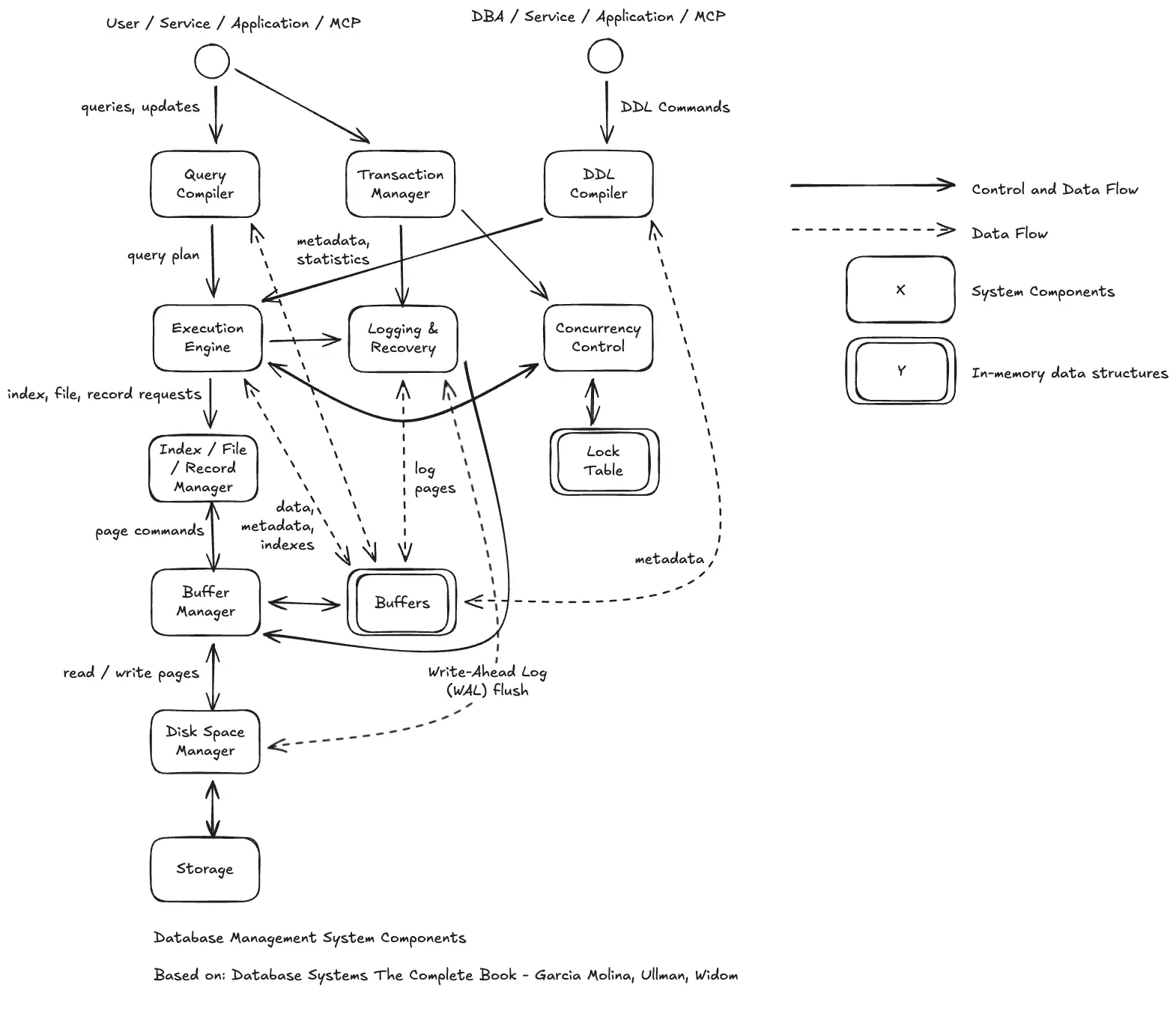
Key flow is:
- Connection: The app connects (often via a Connection Pooler).
- Input: Queries (DML) or Schema changes (DDL) enter the system.
- Compilation: The Query Compiler validates the SQL and consults Statistics (populated by ANALYZE) to create a plan.
- Execution: The Execution Engine processes the plan, requesting records.
- Safety First: Before data is changed, the Logging & Recovery component flushes the WAL to the disk.
- Data Access: The Buffer Manager checks if the data is in RAM. If not, it tells the Disk Space Manager to fetch the physical pages from Storage.
Database vs Database Management System
To make it dead simple, database is anything that resembles organized collection of elements. Example list of books in the library is the database of books. List of available products that we sell is a database of products etc.
Databases are key component of most (not to say all) elements of software.
To visualize it from tech perspective, imagine a simple .CSV file - example of books database named books.csv.
title, author, isbn
Lord Of The Rings,J. R. R. Tolkien,ABC123
Hobbit,J. R. R. Tolkien,CDE456
If we want to extract information out of it, we need to parse this data.
import csv
with open('books.csv', newline='') as csvfile:
    books = csv.reader(csvfile, delimiter=',', quotechar='|')
    for row in books:
        print(', '.join(row))
Database Management System (DBMS) on the other hand is a software system that allows other services and applications to read, store and analyze data in a form of database.
Examples of DBMS’s are: Oracle, PostgreSQL, MySQL, Microsoft SQL Server - example of books database inside of DBMS with the defintion (DDL - Create) of books data model and added informations (DML - INSERT).
CREATE TABLE IF NOT EXISTS books (
    name text,
    author text,
    isbn text
);

INSERT INTO books (name, author, isbn)
     VALUES ('Lord Of The Rings','J. R. R. Tolkien','ABC123'),
            ('Hobbit','J. R. R. Tolkien','CDE456');
If we want to extract information out of it, we can use simple SQL syntax.
SELECT * FROM books;
Data Models
A data model is a collection of concepts for describing the data in a database. A schema is a description of a particular collection of data, using a given data model.
If the Data Model is the language (e.g., English), the Schema is the specific book written in that language.
For more general term you may come across “data model” as objects definition for relational model of some domain part, ex. data model of ERP system.
For current explanation sake data model is the way how you actually store your data and there are number of ways to do it:
Common
- Relational
CREATE TABLE IF NOT EXISTS books (
    name text,
    author text,
    isbn text
);

INSERT INTO books (name, author, isbn)
     VALUES ('Lord Of The Rings','J. R. R. Tolkien','ABC123'),
            ('Hobbit','J. R. R. Tolkien','CDE456');
- Document (JSON / XML / Object)
CREATE TABLE IF NOT EXISTS books (
    id bigint,
    doc jsonb
);

INSERT INTO books (id, doc)
     VALUES (1, '{"name": "Lord Of The Rings", "author": "J. R. R. Tolkien", "isbn": "ABC123"}'),
            (2, '{"name": "Hobbit", "author": "J. R. R. Tolkien", "isbn": "CDE456"}');
- Key-Value
- Graph
Specialized
- Vector (Array)
With usage of PostgreSQL extension - pg_vector.
CREATE EXTENSION IF NOT EXISTS vector;

CREATE TABLE IF NOT EXISTS books (
    id bigint PRIMARY KEY,
    title text,
    embedding vector(3)
);

INSERT INTO books (id, title, embedding)
     VALUES (1, 'Lord Of The Rings', '[0.1, 0.5, -0.2]'),
            (2, 'Hobbit', '[0.2, 0.4, -0.1]');
- Wide-Column
Legacy
- Hierarchical
- Network (mostly for historical context)
Elements of Database Management System
This section will fit perfectly to Disk-Based RDBMS: PostgreSQL, MySQL (InnoDB), SQL Server, and Oracle DB architecture very well.
It might not fit for:
- In-Memory Databases (e.g., Redis, Memcached): These architectures wouldn’t have the heavy emphasis on a “Buffer Manager” swapping pages to disk, nor the same “Storage Manager” hierarchy.
- Distributed Systems (e.g., Cassandra, DynamoDB): A general distributed DB diagram would need a “Cluster Manager” or “Replication Protocol” layer sitting above or alongside the Transaction Manager.
- LSM-Tree Databases (e.g., RocksDB, LevelDB): While they have buffers (MemTable) and storage (SSTables), the “Index/File/Record Manager” box would function quite differently (compaction rather than page updates).
Architecture In Depth
Interface & High-Level Management
- Connection Pooler (The Modern Entry Point): Before hitting the compiler, most production apps talk to a pooler (like PgBouncer). It manages a “pool” of warm connections so the DBMS doesn’t waste resources creating a new process for every single query.
- User / Service / Application / MCP: The external entities interacting with the database. MCP (Model Context Protocol) represents modern AI agents or LLM-based services that now query databases directly to retrieve context for prompts.
- Transaction Manager: The “coordinator” of the system. It ensures the ACID properties by tracking transaction states and coordinating with Concurrency Control and Logging.
- DDL Compiler: Specialized compiler for schema modifications (Data Definition Language). It processes commands like CREATE TABLE or DROP INDEX and updates the system catalog/metadata.
Query Processing Layer
- Execution Engine: The “muscle” that carries out the plan by requesting specific data objects from the lower-level managers.
- Query Compiler: Parses raw SQL and generates an efficient Query Plan.
Pro-Tip: The compiler relies on Metadata & Statistics to choose the best plan. In systems like PostgreSQL, running the ANALYZE command is what updates these statistics, telling the compiler how many rows are in a table and how values are distributed.
Example of query plan
Using EXPLAIN ANALYZE

Hash Left Join  (cost=35290.00..86584.50 rows=850000 width=90) (actual time=219.280..645.365 rows=850000.00 loops=1)
  Hash Cond: (dp.id = dp2.id)
"  Buffers: shared hit=984 read=16404, temp read=14644 written=14644"
  ->  Seq Scan on products dp  (cost=0.00..17194.00 rows=850000 width=45) (actual time=0.015..35.194 rows=850000.00 loops=1)
        Buffers: shared hit=539 read=8155
  ->  Hash  (cost=17194.00..17194.00 rows=850000 width=45) (actual time=218.732..218.733 rows=850000.00 loops=1)
        Buckets: 131072  Batches: 16  Memory Usage: 5568kB
"        Buffers: shared hit=445 read=8249, temp written=7307"
        ->  Seq Scan on products dp2  (cost=0.00..17194.00 rows=850000 width=45) (actual time=0.005..44.911 rows=850000.00 loops=1)
              Buffers: shared hit=445 read=8249
Planning Time: 0.150 ms
Execution Time: 665.022 ms
Transaction & Safety Layer
- Concurrency Control: The “traffic cop” that uses the Lock Table to prevent conflicts between simultaneous transactions.
- Lock Table (In-Memory): A hash table or similar structure in RAM that tracks which transactions hold locks on which data items (rows, pages, or tables).
- Logging & Recovery: The “safety net.” It records all changes to the Write-Ahead Log (WAL).
- The Durability Secret: To ensure the “D” in ACID (Durability), the system flushes the WAL to disk before the actual data pages are updated. If the power goes out, the database can “replay” the log to recover any data that hadn’t reached the final storage yet.
Data Access & Storage Layer
- Index / File / Record Manager: The “organizer.” It maps logical data requests (e.g., “Get the record for User ID 10”) into physical page requests. It understands how data is structured inside pages (headers, slots) and how to navigate indexes (B-Trees).
- Buffer Manager: The “cache controller.” It manages the Buffers (RAM). Its goal is to minimize expensive disk I/O by keeping frequently accessed pages in memory. It decides which pages to swap out (evict) when memory is full.
This is why ‘Buffer Cache Hit Ratio’ is a primary metric for DBAs; if the Buffer Manager can’t find data in RAM, your query speed drops significantly as it waits for the Storage Manager to perform a disk read.
- Buffers (In-Memory): The region of RAM partitioned into page-sized frames. It holds data pages, index pages, and log pages currently being operated on.
- Storage Manager (Disk Space Manager): The “OS interface.” It manages the allocation and deallocation of physical disk space. It handles the low-level reading and writing of page blocks to the file system.
- Storage (Disk): The non-volatile physical media (SSD/HDD) where the database files and logs permanently reside.
Flow
- Queries & Updates
- Query Compiler: The raw text SQL entering the system.
- Metadata, Statistics: Crucial feedback loop. The Query Compiler reads statistics (e.g., table size, value distribution) from the buffers to choose the smartest execution plan.
- Query Plan
- Execution Engine: The optimized set of instructions (relational algebra) passed to the engine.
- Index, File, Record Requests: The Execution Engine asking for logical data objects (tuples) without worrying about which disk block they live on.
- Page Commands: The Record Manager translating logical requests into specific “Fetch Page X” commands for the Buffer Manager.
- Read / Write Pages: The physical transfer of data blocks between the Buffer Manager (RAM) and Storage Manager (Disk).
Summary
Hopefully now you clearly understand the simplification in term “database” and what is actually happening behind the scenes.
A database is just the data; a DBMS is the machinery that makes that data reliable (ACID), accessible (SQL), and fast (Indexing/Buffers).
Understanding these layers helps you write better queries and debug performance issues more effectively.
Thanks,
Krzysztof
Want to be up to date with new posts?
Use below form to join Data Craze Weekly Newsletter!